
Screenshots
About Kit Analog Clock Live Wallpaper-7
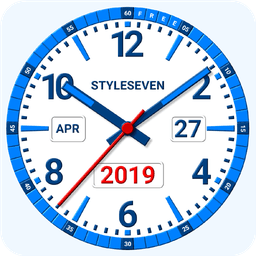
Kit Analog Clock Live Wallpaper-7 transforms your home screen into a customizable analog timepiece that works across multiple display modes. This analog clock app functions as a live wallpaper, home screen widget, floating clock, fullscreen display, screensaver, and standard app window—all in one flexible package.
Choose from seven dial designs, seven hand styles, and seven color themes, or create your own custom look by selecting any solid color or image from your device as the background. Control exactly what appears on the dial: show or hide the date, month, day of the week, and battery percentage. Add a digital clock display, type custom text like your name or year, or switch to a special serif font for a refined appearance. The second hand can be customized in color or hidden entirely.
Enable Night Clock mode for a calm, battery-efficient experience with a black background and dark-gray hands that reduce power consumption. The random position feature shifts the clock every minute to protect your screen from burn-in damage. Double-tap the clock to hear the current time spoken aloud, or set it to announce the time periodically—every hour, for example.
Always on Screen mode keeps your clock visible even when the display is off, creating a persistent time reference without draining your battery excessively. This mode includes brightness control and auto-lock on exit for added convenience. Position and resize your clock freely on the home screen—for live wallpaper, use settings to adjust size and placement; for widgets, use standard drag-and-drop gestures; for the floating clock, use drag and drop to move it or long-touch to open the app.
Note that the app widget has some technical limitations: battery charge display, hand shadows, 3D effects, and voice announcements are unavailable in widget form. On Android 11 and below, only standard color themes appear in widgets, and the second hand is hidden. Android 12 and higher show the second hand in widgets.
Kit Analog Clock Live Wallpaper-7 gives you full control over appearance and functionality, whether you're using it as a screensaver while charging, a persistent on-screen clock, or a stylish home screen decoration.
Pros & Cons
Pros
- Seven display modes offer flexibility for different use cases
- Extensive customization of dial design, colors, and text options
- Night Clock mode reduces battery drain with dark theme
- Always on Screen keeps clock visible without excessive battery use
- Anti-burn-in feature automatically shifts clock position every minute
Cons
- Widget form lacks battery display, shadows, 3D effects, and voice
- Android 11 and below widgets limited to standard color themes only
- Always on Screen mode may still impact battery life over time
- Multiple display modes and settings create significant learning curve
Related Apps

AlienGUIse
Desktop themes and manager for Windows — transform your system with 5 futuristic designs.

SharpKeys
Remap keyboard keys to launch apps, media controls, and custom commands on Windows.

RocketDock
Desktop launcher for Windows — quick access dock with customizable icons and positioning.

Custom Resolution Utility (CRU)
Display resolution utility: Create custom resolutions for your monitor with precise refresh rate control.

Lagguy Wallpapers
Lagguy
4K & HD wallpapers for Android — minimal, abstract, nature, AMOLED designs with lifetime access

Lock Screen OS
Apps Genz
Customize your lock screen with widgets, photos, and notifications. Replace Android's default lock screen.
Latest Articles
Best Adobe Audition alternatives for desktop in 2026 (7 tested)
Jul 10, 2026

Best Adobe Podcast alternatives for desktop in 2026 (we tested 7)
Jul 10, 2026
Best AI computer-use agent apps for desktop in 2026 (we tested 7)
Jul 10, 2026

Best aimasukptn alternatives in 2026 (we tested 7)
Jul 10, 2026
Best Apple TV+ alternatives on desktop in 2026 (7 streaming services)
Jul 10, 2026